

Workflow recipes
These recipes reflect recurring shapes seen in production traffic and support investigations. Customer-specific details and counts are intentionally omitted; all identifiers and payload values below are synthetic.
The recurring patterns behind these recipes are:
- direct order creation that delegates provider choice to a merchant strategy;
- quote-at-checkout flows that refresh availability before order creation;
- webhook-driven fulfillment paired with API reconciliation;
- recovery from ambiguous create timeouts using a stable external identifier;
- cancellation by the canonical First Delivery order ID; and
- asynchronous exports for reporting instead of unbounded order polling.
Recipe 1: Create and auto-route directly
Section titled “Recipe 1: Create and auto-route directly”Use when: the merchant’s configured strategy should choose the fleet and the customer does not need to compare providers at checkout.
This is the simplest production pattern:
- Resolve or store the First Delivery merchant ID during onboarding.
- Confirm that strategy routing is enabled for the merchant’s territory (EXTERNAL FLEETS in Dispatch /
auto_dispatchin the Territory API). - Create an order without
quote_idorstrategy_id. - Let the merchant, territory, or operator-default strategy select the fleet.
- Save
order.id,_request_id,auto_route, and the provider delivery ID when present. - Follow fulfillment through webhooks and reconcile with the Orders API.
curl 'https://api.firstdelivery.com/api/v3/orders' \ --request POST \ --header "Authorization: Bearer $FIRST_DELIVERY_API_KEY" \ --header 'Content-Type: application/json' \ --data '{ "merchant_id": "MERCHANT_ID", "external_id": "commerce-order-1042", "external_order_reference": "1042", "customer_name": "Example Customer", "customer_phone": "+13175550123", "payment_type": "online", "subtotal": 32.00, "tax": 2.56, "tip": 6.00, "order_total": 40.56, "contents": [ { "name": "Example item", "price": 16.00, "quantity": 2 } ], "pickup": { "instructions": "Ask for order 1042" }, "dropoff": { "full_address": "100 Example St, Philadelphia, PA 19106", "instructions": "Apartment 4B; call on arrival" } }'Important: type: "success" means the order was committed. Check auto_route.success separately to learn whether an external delivery was placed.
Recipe 2: Quote, let the customer choose, then create
Section titled “Recipe 2: Quote, let the customer choose, then create”Use when: checkout displays provider price/time choices or the customer can choose a fleet.
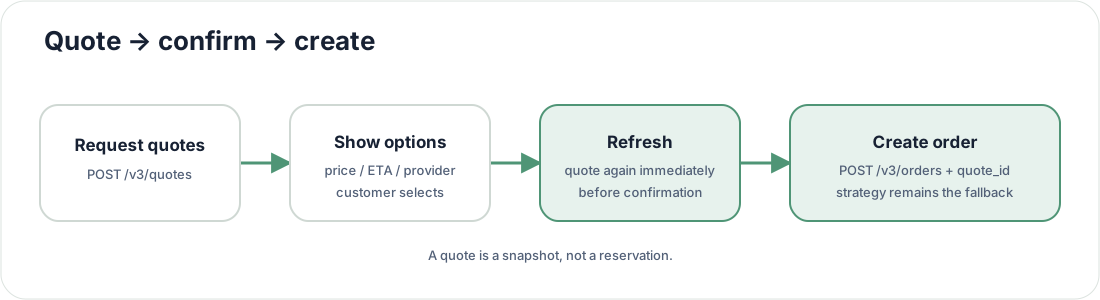
- Request quotes with the same merchant, address, schedule, subtotal, tip, items, and options that will be used to create the order.
- Present
quotesto the customer. Useall_quotesonly for diagnostics; it can include providers banned by the strategy. - Before final confirmation, request quotes again. Provider prices and availability change.
- Send the selected quote
idasquote_idon order creation. - If the selected provider rejects, First continues through the resolved strategy.
Never treat a quote as a reservation.
quote_id does not enable create-time routing by itself. The territory must have strategy routing enabled, or the order must include an explicit strategy_id.
Recipe 3: Override the strategy for one order
Section titled “Recipe 3: Override the strategy for one order”Use when: the same merchant needs a distinct routing policy for a known workflow, such as catering or a special service tier.
{ "merchant_id": "MERCHANT_ID", "strategy_id": "STRATEGY_ID", "external_id": "special-order-1043", "...": "the remaining create-order fields"}strategy_id takes precedence over merchant, territory, and default strategy assignment. Strategy hours and manual-dispatch tripwires still apply.
Supplying strategy_id can explicitly route an order even when the territory would not normally auto-route at creation. Use stable, preconfigured strategies; do not create a new strategy for every order.
Recipe 4: Create a scheduled order
Section titled “Recipe 4: Create a scheduled order”Use when: pickup or delivery must happen at a future target time.
Send exactly one scheduling field:
{ "pickup_time": "2026-11-05T18:30:00Z"}or:
{ "dropoff_time": "2026-11-05T19:15:00Z"}Rules:
- send
pickup_timeordropoff_time, never both; - use ISO 8601 with an explicit UTC offset;
- the target must be at least 20 minutes in the future;
- provider-specific scheduling thresholds can be longer;
- a strategy can hold scheduled orders for manual dispatch; and
- sandbox lifecycle simulation is fastest when both fields are omitted.
Persist the requested time separately from provider estimates. They answer different questions.
Recipe 5: Webhook-first fulfillment with polling reconciliation
Section titled “Recipe 5: Webhook-first fulfillment with polling reconciliation”Use when: your system updates customer messaging, kitchen state, billing, or support workflows from delivery progress.
The robust production pattern is enqueue first, process second, reconcile when correctness matters:
async function receiveFirstWebhook(payload: FirstWebhook) {  await durableQueue.enqueue({    dedupeKey: canonicalHash(payload),    payload,  })
  return { status: 204 }}
async function processFirstWebhook(payload: FirstWebhook) {  if (await alreadyProcessed(payload)) return
  await applyMonotonicLifecycleUpdate(payload)
  if (isBusinessCritical(payload)) {    const current = await first.getOrder(payload.orderId)    await reconcileWithAuthoritativeOrder(current)  }}
Use a durable dedupe key based on orderId, status_v3, event, relevant timestamp, or a canonical payload hash. Do not rely on First’s short-window duplicate suppression.
Do not assume:
- every intermediate event will arrive;
- events arrive in lifecycle order;
- driver/location fields are always present; or
- one status appears only once.
Recipe 6: Recover after a timeout
Section titled “Recipe 6: Recover after a timeout”Use when: your create request timed out or the connection closed before a response was received.
- Do not immediately create a second order.
- Search/reconcile using your stable
external_id. - If an order exists, continue with that First Delivery
order.id. - If no order exists after a bounded reconciliation window, retry with the same external identifier according to your duplicate policy.
- Keep the original timestamp and request metadata for support.
An HTTP timeout is not evidence that the order transaction rolled back.
Recipe 7: Cancel safely
Section titled “Recipe 7: Cancel safely”Use when: the customer, merchant, or ordering platform withdraws a delivery.
- Resolve the exact First Delivery
order.id. - Call the published cancel endpoint using that ID.
- Persist the cancellation response.
- Refetch the order.
- Accept the
cancelledwebhook idempotently.
Do not cancel by an ambiguous external identifier and do not update status locally. A provider can reject cancellation after pickup or another provider-specific cutoff.
If another delivery should be attempted, explicitly begin the replacement workflow and allow reassign to start a new lifecycle.
Recipe 8: Export orders for reporting
Section titled “Recipe 8: Export orders for reporting”Use when: analytics, finance, or operations needs a bounded dataset.
- Use a named client with
reports:read. POST /v3/orders/exportwith explicit date/filter bounds.- Save the export job ID.
- Poll
GET /v3/orders/export/:idwith backoff. - Download only after the job is ready.
- Store the file according to your retention and access policy.
Do not use a human admin session or repeated unbounded order-list polling for reporting jobs.
Production readiness checklist
Section titled “Production readiness checklist”- Separate sandbox and production keys and configuration.
- Use a stable unique
external_id. - Store First Delivery order IDs and request IDs.
- Normalize and validate phone numbers and addresses.
- Decide whether orders use the merchant strategy, an explicit strategy, or customer-selected quotes.
- Implement idempotent webhooks plus reconciliation.
- Alert on
auto_route.success: false, non-2xx webhook responses, and stale pending orders. - Exercise cancellation and provider rejection paths before launch.
- Document which provider-specific options your product exposes.